Decisions get made in meetings. The reasoning rarely outlives them.
Vendors are chosen. Projects scoped. Policies set. Budgets agreed. At the time, everyone in the room knows why. Three months later, the questions come back round, often from people who weren’t in the room. Why did we pick that supplier? Who actually signed off on it? Did it work?
Decision Planner gives those questions a single, searchable answer. The same SharePoint list that holds the record carries the audit trail; a built-in review cycle prompts you to log what actually happened against the rationale you set out at the time.
The register, the radar, and the dashboard, on one page
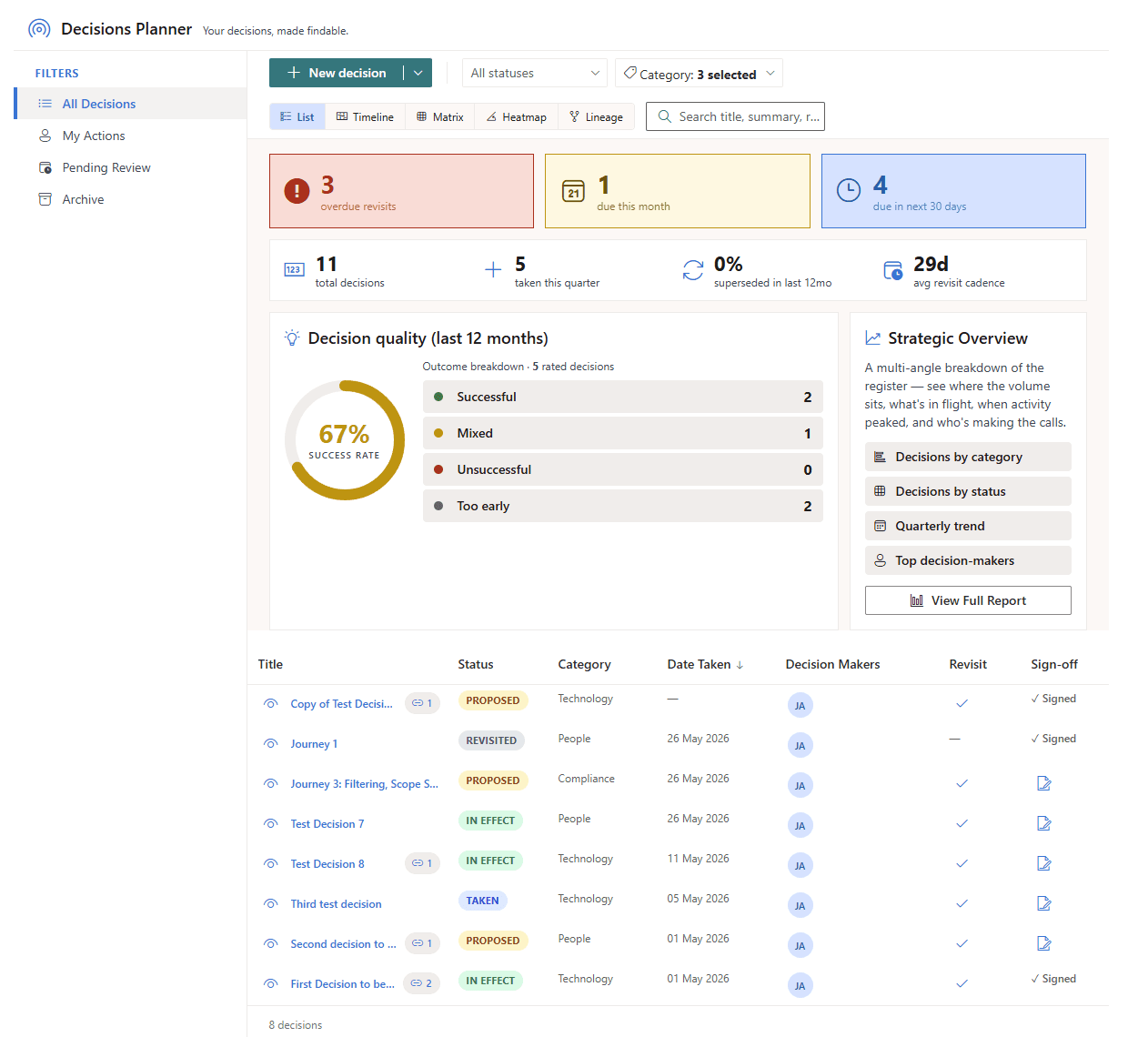
Open it and three things load together. The decision register sits at the bottom, sortable and searchable. Above it, the Revisit Radar surfaces what is overdue, due this month, and due in the next thirty days. Off to the right, the Quality Dashboard reports the success rate from outcomes you actually recorded, with a one-click breakdown by category, by status, by quarter, and by decision-maker.
Capture, then sign off
One form for the title, summary, options considered, rationale, and decision-makers, on every tier. On Standard and Enterprise, one click signs off and locks the record from edits. SharePoint version history carries the rest.
A review cycle, not a wish
Every decision is captured with a revisit date. When the date arrives, you record the outcome against the original rationale: Successful, Mixed, Unsuccessful, or Too early to say.
Success rate, measured
The Quality Dashboard reads outcomes you actually wrote down. No sentiment, no vanity number: the gauge moves only when revisits land, and the trend tells you whether your calls are improving.
Why teams choose Decision Planner
A register for the questions you keep being asked
The product is the same whether you are an exec team logging strategic calls, a programme office tracking change-control decisions across multiple workstreams, a compliance function maintaining a signed-off audit register, or an operational team writing down “we agreed to do this, here’s why” so the next person up to speed doesn’t have to ask.
Why a register, not yet another tool
“We can finally answer ‘why did we decide that?’ without going back through three months of email.”
That is the value Decision Planner is built around. Decision Planner is deployed inside JFDI client tenancies today; customer stories will land here as soon as those customers are willing to be named. Until then, the features page walks through every view, dashboard, and dialog with the actual product screenshots.
The audit chain you already trust
Your tenant, your list, your version history
Decision Planner reads and writes a single SharePoint list inside your Microsoft 365 tenant. Every edit before sign-off appears in that list’s version history, with the user who made it. List content stays in your SharePoint. The licence check identifies the user and tenant to read that user’s Marketplace entitlement. Mention notifications go out by email or Teams chat once an administrator approves their Microsoft Graph permissions.
Remove it and the records stay put
The decision list is yours, owned by the site collection where it lives. Uninstalling Decision Planner removes the web part, not the records. Retention, permissions, and search all keep working because nothing was ever moved.
See the features
Every view, every dashboard, every gate. List, Timeline, Matrix, Heatmap, Lineage, Quality, Revisit Radar.
Browse the use cases
Executive decision logs, programme decision registers, compliance audit trails, operational team registers.
Ready to keep a clear record of your decisions?
Decision Planner is available free on the Microsoft Marketplace, with a 30-day Enterprise licence that starts once an administrator approves the JFDI Licensing permission, so you can try every feature.